# EasyFortniteStats Documentation

EasyFortniteStats is the ultimate, feature-rich Fortnite Discord Bot which benefits your Fortnite or Gaming Community and is trusted by more than 80,000 Discord servers.

<div data-full-width="false"><figure><img src="/files/26IKxHjvpPxKFLJtDt5V" alt=""><figcaption></figcaption></figure></div>

### Get started with installing the app:

{% content-ref url="/pages/-MTtbFSKkNJ4h1ToOhYi" %}
[Install the App](/start/install)
{% endcontent-ref %}

### Do you like to get started with all commands?

{% content-ref url="/pages/-MTDRF1kjWpD9IXOS56R" %}
[Commands](/commands)
{% endcontent-ref %}


# Commands

Browse the commands for the EasyFortniteStats Bot. Get player data, game insights, and more, all within Discord.

{% hint style="info" %}
The command list can be accessed with `/help`.&#x20;
{% endhint %}

## Stats Commands

<table data-full-width="true"><thead><tr><th>Command</th><th>Description</th></tr></thead><tbody><tr><td><code>/stats lifetime</code></td><td>Retrieve the <strong>lifetime</strong> stats of a Fortnite account.</td></tr><tr><td><code>/stats season</code></td><td>Retrieve the <strong>season</strong> stats of a Fortnite account.</td></tr><tr><td><code>/stats competitive</code></td><td>Retrieve the <strong>competitive</strong> stats of a Fortnite account.</td></tr><tr><td><code>/link</code></td><td>Link your Discord account to your EpicGames account.</td></tr><tr><td><code>/unlink</code></td><td>Remove the linking from your Discord and EpicGames account.</td></tr><tr><td><code>/verify</code></td><td>Verify the ownership of your Fortnite Account.</td></tr><tr><td><code>/nickstats</code></td><td>Show off your stats in your nickname.</td></tr><tr><td><code>/setup stats</code></td><td>Setup and modify the stats settings.</td></tr></tbody></table>

## Account Commands

<table data-full-width="true"><thead><tr><th>Command</th><th>Description</th></tr></thead><tbody><tr><td><code>/account login</code></td><td>Login into your Fortnite account.</td></tr><tr><td><code>/account logout</code></td><td>Logout of your Fortnite account.</td></tr><tr><td><code>/account locker</code></td><td>View your account locker.</td></tr><tr><td><code>/account info</code></td><td>View your profile including V-Bucks.</td></tr><tr><td><code>/account shop buy</code></td><td>Buy an item from the item shop.</td></tr><tr><td><code>/account shop gift</code></td><td>Gift an item to a friend.</td></tr><tr><td><code>/account shop undo</code></td><td>Undo the last purchase you made from the item shop.</td></tr><tr><td><code>/account shop refund</code></td><td>Refund a purchase you bought from the item shop. Some require a refund token.</td></tr><tr><td><code>/account battlepass buy</code></td><td>Buy the battle pass.</td></tr><tr><td><code>/account battlepass buy-levels</code></td><td>Buy battle pass levels. Discounts get applied automatically.</td></tr><tr><td><code>/account battlepass gift</code></td><td>Gifts the battle pass to a friend.</td></tr><tr><td><code>/account friends add</code></td><td>Add a player as a friend or accept their friend request. </td></tr><tr><td><code>/account friends remove</code></td><td>Remove a friend or reject their friend request.</td></tr><tr><td><code>/account friends overview</code></td><td>Get an overview of your friends.</td></tr><tr><td><code>/account lego generate</code></td><td>Generate a LEGO Fortnite world.</td></tr><tr><td><code>/account lego delete</code></td><td>Delete a LEGO Fortnite world.</td></tr><tr><td><code>/account lego list</code></td><td>List your LEGO Fortnite worlds.</td></tr><tr><td><code>/account lego share-key</code></td><td>Share a key with a friend to allow them to join your LEGO Fortnite world at any time.</td></tr><tr><td><code>/account lego remove-key</code></td><td>Removes a key for a LEGO Fortnite world.</td></tr><tr><td><code>/account creator-code</code></td><td>Set your creator code.</td></tr><tr><td><code>/account platform</code></td><td>Change your V-Bucks platform.</td></tr><tr><td><code>/account settings</code></td><td>Manage the account system settings.</td></tr></tbody></table>

## Shop Commands

<table data-header-hidden data-full-width="true"><thead><tr><th>Command</th><th>Description</th></tr></thead><tbody><tr><td>Command</td><td>Description</td></tr><tr><td><code>/shop</code></td><td>Display the current in-game item shop.</td></tr><tr><td><code>/setup shop</code></td><td>Setup and modify the item shop settings.</td></tr></tbody></table>

## News Commands

<table data-header-hidden data-full-width="true"><thead><tr><th>Command</th><th>Description</th></tr></thead><tbody><tr><td>Command</td><td>Description</td></tr><tr><td><code>/news</code></td><td>Display the current in-game news.</td></tr><tr><td><code>/news setup</code></td><td>Setup and modify the news settings.</td></tr></tbody></table>

## Server Status

<table data-header-hidden data-full-width="true"><thead><tr><th>Command</th><th>Description</th></tr></thead><tbody><tr><td>Command</td><td>Description</td></tr><tr><td><code>/server-status</code></td><td>Display the current Fortnite server status.</td></tr><tr><td><code>/setup server-status</code></td><td>Setup and modify the server status settings.</td></tr></tbody></table>

## Map Commands

<table data-header-hidden data-full-width="true"><thead><tr><th>Command</th><th>Description</th></tr></thead><tbody><tr><td>Command</td><td>Description</td></tr><tr><td><code>/map</code></td><td>Display the current Fortnite map.</td></tr><tr><td><code>/drop</code></td><td>Display a random location to drop.</td></tr></tbody></table>

## Radio Commands

<table data-header-hidden data-full-width="true"><thead><tr><th>Command</th><th>Description</th></tr></thead><tbody><tr><td>Command</td><td>Description</td></tr><tr><td><code>/radio</code></td><td>Open the radio player and start the radio playback.</td></tr></tbody></table>

## Misc Commands

<table data-header-hidden data-full-width="true"><thead><tr><th>Command</th><th>Description</th></tr></thead><tbody><tr><td>Command</td><td>Description</td></tr><tr><td><code>/cosmetic</code></td><td>Get information about in-game cosmetics.</td></tr><tr><td><code>/season</code></td><td>Display the progress of the current season.</td></tr><tr><td><code>/event</code></td><td>Display all in-game events with video playback.</td></tr><tr><td><code>/player-count</code></td><td>Display statistics about the Fortnite player count.</td></tr></tbody></table>

## Vote & Review Commands

<table data-full-width="true"><thead><tr><th>Command</th><th>Description</th></tr></thead><tbody><tr><td><code>/vote</code></td><td>Display vote instructions and check vote status.</td></tr><tr><td><code>/review</code></td><td>Display information on how to write a review for the bot.</td></tr></tbody></table>

## Premium Commands

<table data-header-hidden data-full-width="true"><thead><tr><th>Command</th><th>Description</th></tr></thead><tbody><tr><td>Command</td><td>Description</td></tr><tr><td><code>/premium info</code></td><td>Display Premium Info and Instructions on how to subscribe.</td></tr><tr><td><code>/premium enable</code></td><td>Activate Premium on the server where you run the command.</td></tr><tr><td><code>/premium disable</code></td><td>Disable Premium on the server where you run the command.</td></tr></tbody></table>

## Bot Info Commands

<table data-header-hidden data-full-width="true"><thead><tr><th>Command</th><th>Description</th></tr></thead><tbody><tr><td>Command</td><td>Description</td></tr><tr><td><code>/info</code></td><td>Display general information and stats about this bot.</td></tr><tr><td><code>/cluster</code></td><td>Display information about the bot's clusters.</td></tr><tr><td><code>/invite</code></td><td>Show the invite link of the bot.</td></tr><tr><td><code>/data server get</code></td><td>Receive data saved by the bot from your server.</td></tr><tr><td><code>/data server delete</code></td><td>Delete data saved by the bot from your server.</td></tr><tr><td><code>/data user get</code></td><td>Receive data saved by the bot from your user account.</td></tr><tr><td><code>/data user delete</code></td><td>Delete data saved by the bot from your user account.</td></tr></tbody></table>

## Settings

<table data-header-hidden data-full-width="true"><thead><tr><th>Command</th><th>Description</th></tr></thead><tbody><tr><td>Command</td><td>Description</td></tr><tr><td><code>/settings</code></td><td>Manage the bot's settings.</td></tr><tr><td><code>/image upload</code></td><td>Upload an image to the bot.</td></tr><tr><td><code>/image delete</code></td><td>Delete an uploaded image.</td></tr><tr><td><code>/image list</code></td><td>List all uploaded images</td></tr></tbody></table>


# Changelog

Stay updated with the latest changes to the EasyFortniteStats Bot. Here, you'll find version histories, feature updates, and bug fixes detailed chronologically.

{% hint style="info" %}
**Live patches** are updates in which changes are published directly after development. In contrast, with normal updates, the changes are first published in a preview on the beta bot and then published all at once on the normal bot after completion.
{% endhint %}

## V3.7.1 - 2024-10-20 - Live Patch <a href="#v3.7.1" id="v3.7.1"></a>

### Changes/Improvements

* Updated the Item Shop image to more closely resemble the in-game interface, reflecting the Chapter 5 Season 4 update.
* Item Shop reminders now include information on when items will leave the shop.
* Emojis displayed by the bot will now always appear, regardless of External Emoji permissions.
* The new [gift policy](https://www.epicgames.com/help/en-US/c-Category_Fortnite/c-Fortnite_Billingandpayment/how-does-gifting-work-in-fortnite-a000084676) regarding dynamically priced bundles is now respected when gifting items through `/account shop gift`.
* Updated selectable V-Bucks platforms for the `/account platform` command based on recent platform changes: Samsung removed, Apple iOS added.
* When searching for a cosmetic with the `/cosmetic` command, the search language is now overridden by the language selected within the command.
* Updated Lego commands with new Cozy and Hardcore modes and new options for Storm-Wild enemies, Village Animals Removed on Elimination and Player Fly Mode.
* Improved recommendations for custom background images for the Item Shop image.

### Fixes

* Fixed recent stability issues that caused the bot to become unresponsive.
* Fixed an issue where Power Ranking and earnings always displayed as 0 in `/stats competitive`.
* Fixed `/account lego` commands not responding.
* Fixed issue with `/island` auto-complete not working.
* Fixed an error message that duplicated the title when a user wasn't logged in.
* Fixed issue where the `/setup` command was usable in DMs.
* Fixed issue with `/reminder` remove auto-complete when the user has no reminders.
* Fixed issue where the language selected in the `/cosmetic` command wasn't respected.
* Fixed issue that occurred when using `/reminder` list without any reminders set up.
* Fixed issue with `/account shop gift` auto-complete not displaying items.
* Fixed error message not appearing when selecting an item with `/account shop gift` for a player who doesn't accept gifts.
* Fixed issue with the `/stats` command when selecting the option to link an account.
* Fixed issue where purchases couldn't be undone in certain cases.
* Fixed error message not appearing properly when interacting with an inactive account through `/account` commands.

## V3.7.0 - 2024-06-25 <a href="#v3.7.0" id="v3.7.0"></a>

### Additions

* **New Reminder Feature**
  * Set reminders using `/reminder add` to receive notifications once an item is available in the item shop.
  * View all your reminders with `/reminder list`.
  * Delete single reminders with `/reminder remove` or clear multiple reminders with `/reminder clear`.
  * Normal users can set up to 10 reminders, while🔸Premium users can set up to 50 reminders.
* **Added**  [**Linked Roles**](https://support.discord.com/hc/articles/10388356626711-Connections-Linked-Roles-Admins)
  * The connection will show your Fortnite player name, Battle Pass level, lifetime wins and best current rank in Battle Royale or Zero Build.
  * Enable users to self-assign roles by linking their account to EasyFortniteStats.
* **Added support for User Apps**
  * You can now [add EasyFortniteStats to your account](https://discord.com/oauth2/authorize?client_id=444203099331231746).
  * All commands are available, except: `/setup`, `/nickstats`, `/image`, `/settings`, `/radio`, `/data` (support will be added soon)
* Added recent gifts to the gift overview in `/account info`.
* The bot now automatically redeems all real-money purchases upon login or starting a new account session, ensuring that recently purchased V-Bucks and other items are always available.
* Added Power System option to Lego island settings.

### Changes/Improvements

* **Reworked Item Shop Image**
  * Redesigned to closely resemble the in-game interface.
  * Improved visualization of new cosmetics such as LEGO sets and car bundles.
  * Enhanced visibility of Creator Code.
  * Aspect ratio adjusted to almost a square, increasing preview size.
  * Significantly reduced image size for faster loading, especially on mobile devices.
* Reworked `/account info`
  * Reordered sections to prioritize relevant information.
  * Improved selection process for recent V-Bucks purchases.
  * Enhanced visual formatting for better readability.
* Clarified instructions in select menus for setting up channels or roles for auto-updates.
* Improved error messaging when selecting an invalid friend in `/account battlepass gift` and `/account shop gift`.

### Removals

* Removed `/faq` commands, since it isn't used much.

### Fixes

* Resolved issue preventing some cosmetics from being displayed with `/cosmetic`.
* Resolved issue with `/island` not working.
* Fixed errors occurring with recent purchases in`/account info`.
* Resolved issue with friend overview selection in `/account friends overview` when having many friends.
* Fixed an issue, when trying to redeem an expired code with `/account redeem-code`.
* Resolved issue when attempting to gift an item to a friend who does not accept gifts with `/account shop gift`.
* Fixed an issue that caused all `/account` commands to fail <mark style="color:purple;">\[Hotfixed in V3.6.1]</mark>
* Fixed an issue that prevented the shop from being published <mark style="color:purple;">\[Hotfixed in V3.6.1]</mark>

## V3.6.1 - 2024-03-24 - Live Patch <a href="#v3.6.1" id="v3.6.1"></a>

### Additions

* Added support for Aura, Drift Trail, Boost, Lego Build and Lego Decor Bundle cosmetics
* Added support for new Friendly Damage option in `/account lego` commands.

### Changes/Improvements

* Locker cosmetic type filter now summarizes a few types e.g. all car related items in "Cars"
* Improve visualization for crowned wins for season stats in `/account info`.
* The voting advertisement in the automatic shop updates has now been better integrated as a button

### Removals

* Removed creative news, since they got discontinued in late 2021

### Fixes

* Fixed shop being hung, when item shop is empty.
* Fixed an issue that items be available in `/account shop undo` or `/account shop refund` as undoable (free refundable), even trough they aren't. This was the case, when an item has been purchased, undone, purchased again and then tried to undo again.
* Fixed an issue that caused a wrong message to be displayed when logging out.
* Fixed an error when using `/account friends overview`, but no friend got an avatar.
* Fixed an issue, where users where available to bypass the Creator Code ad.
* Fixed an issue, which caused the Battle Pass related feature to be unavailable.
* Fixed an issue, so a proper error message will be shown, when using invalid friends in `/account shop gift`.
* Fixed an issue with the Server Status, that caused maintenance state to cause issues.
* Fixed an issue with the V-Bucks overview in `/account info`.
* Fixed an issue for gifting autocomplete, due to friends have never played the game.
* Fixed an issue with `/cosmetic` showing an error message for a few cosmetics

## V3.6 - 2024-01-20

### Additions

* **New Locker Filters:**
  * Introducing additional filters for the locker, enabling users to filter cosmetics based on exclusivity, uniqueness, availability from Fortnite Crew, FNCS, Save the World, those not in the Item Shop for 1000+ days, and Battle Pass items.
  * Added the ability to filter cosmetics by chapter.
  * When selecting a filter within a single category (e.g., different cosmetic types), all items associated with each selected option will be included. However, when opting for options from distinct filters (e.g., cosmetic type + chapter), only items present in both filters will be visible.
* **Support for New Cosmetic Types:**
  * Extended support for new cosmetic types, including Car Bodies, Decals, Wheels, Jam Tracks, Guitars, Basses, Drums, Microphones, and Keytars in the item shop, `/cosmetic` command, and `/account shop` commands.
* **LEGO Fortnite Support:**
  * Generate worlds with `/account lego generate` and delete them with `/account lego delete`.
  * Manage access to your worlds with `/account lego share-key` and `/account lego remove-key` to add or remove key holders who can play at any time.
  * Gain a comprehensive overview of your LEGO Fortnite worlds with `/account lego list`, providing information on settings, total playtime, key holders, and currently playing players.
* Added an overview for purchased/redeemed V-Bucks in the `/account info` section.
* Introduced the new `/account redeem-code` command for effortless code redemption within Discord.
* Added `/account friends overview` for a comprehensive view of your friends.
* Added the `/island` command, offering a detailed overview of creative islands, complete with the current player count. This command supports island searches by Name, Tag, and Code.
* 🔸Added auto Creator Code refresh for premium users. Set this up with the new `/account settings` command.

### Changes/Improvements&#x20;

* Reworked the shop image to be significantly wider and more readable.

<figure><img src="/files/mHhU99PmN3et2S5BMD49" alt="" width="375"><figcaption><p>Improved shop design</p></figcaption></figure>

* Reworked Server Status:
  * Now includes Crew, Fortnite Lego, Rocket League Racing, and Fortnite Festival status.
  * Switched to using Discord timestamps for a more accurate countdown, eliminating the need for frequent updates every few minutes.
* Improved the `/account login` command by allowing its use again while in an active login session. Old sessions are now closed, and the command has a 30-second cooldown.
* Reworked the radio system's internal structure for a potentially more stable experience.
* When not selecting a cosmetic type filter, the overall amount of cosmetics will now be displayed.
* Enhanced the calculation of player count for the `/player-count` command by including more maps, resulting in an even more accurate representation of active players.
* The bot will no longer respond when replying to its messages, only when mentioned.
* Reversed the V-Bucks purchase history to show recently purchased items first.

### Removals

* Removed the ability to pause the radio player.

### Fixes

* Resolved an issue preventing creator code info from appearing for premium users on the `/account battlepass buy-levels` command.
* Fixed a bug causing Fortnite player searches to not function as expected (e.g., the `/stats` command).
* Addressed an issue occurring when a user attempted to add themselves as a friend.
* Corrected the gift requirement to be set at 2 days instead of 3.
* Fixed issues with the account system after deleting user data with the `/data user delete` command.
* Resolved an issue where users were being logged out during server issues with Epic Games servers.
* Fixed a bug causing the shop to be sent again, even though no visible item was changed.
* Fixed a bug where some emotes may appear multiple times.
* Fixed an issue preventing a return to already viewed cosmetic selections in the locker.
* Fixed an issue preventing changing pages in the locker.
* Fixed an issue that showed the cosmetic amount in filters 1 higher than it was actually.
* Solved an issue that caused all cosmetics to be shown when selecting a filter that included no owned cosmetics. Instead, a proper message will be shown.
* Fixed an issue that caused cosmetics in the locker to be sorted improperly.
* Resolved a bug where the shop image failed to include the section title, leading to a misalignment of items displayed in an extended, single row. <mark style="color:purple;">\[Hotfixed in V3.5.1]</mark>
* Solved an issue that caused cosmetic sources to display as "???" even though the source is already known. <mark style="color:purple;">\[Hotfixed in V3.5.1]</mark>
* Fixed an issue that, after changing premium shop settings, the bot doesn't show an image after using `/shop` <mark style="color:purple;">\[Hotfixed in V3.5.1]</mark>
* Fixed an issue which was caused when using disabled accounts with the account system. Now, a proper message will be displayed. <mark style="color:purple;">\[Hotfixed in V3.5.1]</mark>

## V3.5.1 - 2023-11-06

### Additions

* Implemented a small account overview feature that activates when an already logged-in user utilizes the `/account login` command. This provides users with a quick summary of their account details for added convenience and awareness.

### Changes/Improvements

* Not linked users can now use the `/stats` command with the added option to directly link their account, eliminating the need for an additional `/link` command.
* When setting or changing channels or roles in the settings, the selected values are now consistently displayed, providing users with clear confirmation of their choices.
* Updated the locker account value formula from 1$ = 125 V-Bucks to 1$ = 111 V-Bucks to align with recent [changes in V-Bucks pricing](https://www.fortnite.com/news/upcoming-fortnite-pricing-alignment-in-czech-republic-denmark-eurozone-countries-united-states-and-more-in-october-2023). <mark style="color:purple;">\[Hotfixed in V3.5]</mark>
* Added a note to the `/account locker` command explaining how the locker value is determined, providing users with transparency and clarity.
* Enhanced the calculation of player count for the `/player-count` command by including more maps, resulting in a more accurate representation of active players.
* Changed the Creator Code command from `/account creator-code` to `/account creator-code set` for future-proofing and clarity in command usage.
* Premium users now have the ability to select a creator code before making purchases trough the account system
* Implemented various optimizations to enhance overall system performance, ensuring a smoother and more efficient user experience.

### Fixes

* Resolved an issue where users could unintentionally receive premium benefits after ending their subscription through Discord
* Addressed timeouts occurring in the `/account` commands, where the application failed to respond.
* Fixed a problem with bundle discounts in the `/account buy` command; when users already possessed most items in a bundle, it now correctly displays and offers the bundle at the minimum price.
* Rectified a rare occurrence where the shop would appear multiple times.
* Eliminated the occurrence of creator code ads appearing when premium users purchased items through the bot.
* Corrected game mode-specific player counts not updating and inaccurate peak player counts.
* Resolved users getting stuck after encountering an error message during account login.
* Implemented a workaround for account commands to consistently fail for a small subset of players.
* Improved the error messaging for specific cases in the `/account battlepass buy-levels` command.
* Fixed delays in the `/account shop` commands, ensuring the latest items are promptly displayed.
* Addressed an issue where an error message was shown instead of proper information when using `/account shop gift` without selecting a valid friend.
* Fixed an issue causing an error message when users searched for refundable items without recent purchases.
* Rectified display issues with refundable items in `/account shop refund` <mark style="color:purple;">\[Hotfixed in V3.5]</mark>
* Corrected the prevention of the shop from being updated <mark style="color:purple;">\[Hotfixed in V3.5]</mark>
* Fixed the unavailability of gift selection <mark style="color:purple;">\[Hotfixed in V3.5]</mark>
* Resolved issues with the Shop command when executed by users with a different language setting than the server, ensuring premium elements display correctly <mark style="color:purple;">\[Hotfixed in V3.5]</mark>
* Fixed premium rights distribution to Patreon subscribers due to the introduction of free Patreon memberships <mark style="color:purple;">\[Hotfixed in V3.5]</mark>
* Rectified the Shop command in DMs <mark style="color:purple;">\[Hotfixed in V3.5]</mark>
* Addressed inflated numbers in the `/player-count` command <mark style="color:purple;">\[Hotfixed in V3.5]</mark>
* Corrected the `/account battlepass buy` command for the new season following significant changes  <mark style="color:purple;">\[Hotfixed in V3.5]</mark>

## V3.5 - 2023-08-27

### Additions

* **New Ranked Stats:**
  * Build and Zero Build Rank with progress tracking
  * Unreal Global Ranking
  * Lifetime Competitive Stats expansion: now includes Ranked Stats, Tournament Stats and Legacy Arena Stats

<figure><img src="/files/bl45uFPxb0ue7kNQznde" alt=""><figcaption><p>New Competitive Stats including Ranked</p></figcaption></figure>

* **Discord App Premium Integration:**
  * Subscription is now available both via the Bot's profile and the [App Directory](https://ptb.discord.com/application-directory/444203099331231746)
  * Subscription pricing remains the same ($5 + tax). However, a $0.5 discount is applied on Patreon to offset fees
  * Enhanced view for the Premium overview
* Added a feature to the `/drop` command: users can now choose only named locations. *\[Suggested by `@fhl09`]*

### Changes/Improvements

* **Stats Commands Overhaul:**
  * Stats commands now mandatorily require the `player` option. This lets users select the linked account or Discord user or search for a player
  * The input type option and pre-selection has been removed, instead the accumulated Global input is selected by default
* **Streamlined Account Linking:**
  * The Link and Verify processes have been merged into a single system. Users simply need to open the EpicGames verification page
* Disabled the account verification feature in the account system due to its confusing nature and potential misuse by account traders
* Revamped the `/help` command by introducing new icons and incorporating previously missing commands from the Account and Misc categories
* Enhanced the `/cosmetics` command's shop history feature, which now organizes consecutive days to provide a more coherent and concise overview
* Optimized the message output for the `/event` command to offer a more refined and informative experience

### Fixes

* Addressed an unresponsiveness issue (resulting in an "interaction failed" error) occurring during specific time periods
* Rectified an error encountered when utilizing the `/account refund` and `/account undo` commands in cases where a user had no recent purchases
* Resolved an issue that was preventing the initial message from being sent after configuring the item shop, server status, or news
* Corrected an issue that caused unintended information to be included in automated item shop or server status posts, potentially leading to advertisements in premium server messages
* Enhanced the error message handling for the `/account shop gift` command to provide clarity when a player is ineligible for gifting
* Adjusted the shop image stroke for discounted prices

## V3.4.1 - 2023-06-09

This updates focuses on Bugfixes and Improvements for the recently introduced Account System

## Additions

* Introduced new commands for Battle Pass and additional levels:
  * `/account battlepass buy`: Purchase the Battle Pass or the Battle Bundle (Battle Pass + 25 levels)
  * `/account battlepass buy-levels`: Purchase additional Battle Pass levels. Discounts, like the 25 level bundle, are automatically applied

### Changes/Improvements

* Updated`/account info`:
  * Added information about Supercharged XP
  * Included the number of purchased Battle Pass levels
  * Added a level progress bar to display the current XP
  * Provided information about current and past bans
  * Simplified the Season section&#x20;
* Simplified responses for the `/data server get` and `/data user get` commands
* Made volume selection persistent in the radio menu, eliminating the need for a separate button
* The Bot now displays users who choose a new username without the `#0` at the end

### Fixes

* Deployed over 50 fixes for the new account system introduced in V3.4.0. The system now works well with only minor quirks
* Fixed a major issue that could blocked users from accessing any `/account` command for an hour
* Fixed issue that friend related commands autocomplete doesn't work, which prevented users from accessing these
* Fixed issue that prevent users from gifting items, due to a bugged gift wrap selection
* Fixed the text in `/account shop gift` command when gifting an item.
* Fixed `/data user get` for users that are logged in to the account system
* Fixed issues with the Gift History in `/account info`
* Fixed error which appeared in some cases when purchasing something with an insufficient amount of V-Bucks

## V3.4.0 - 2023-04-21

This patch is the finalize the migration from prefixed commands (e.g. `!fn shop`) to slash commands (e.g. `/shop`).

### Additions

* Added new Account Management System \[BETA]: This new System allows you to manage your Fortnite Account right from Discord
  * `/account login` - Login into your Fortnite account
  * `/account locker` - View your locker items, filter them and check your account value
  * `/account info` - Get an overview of your account
  * `/account claim-daily` - Claim your daily Save the World reward
  * `/account creator-code` - Set your current creator code
  * `/account shop buy` - Buy an item from the item shop
  * `/account shop gift` - Gift an item from the item shop to a friend&#x20;
  * `/account shop undo` - Undo a recent purchase
  * `/account shop refund` - Refund a purchase using a refund token
  * `/account friend add` - Add a player as a friend
  * `/account friend remove` - Refund a purchase using a refund token
  * With more coming soon including: Friends overview, Auto Creator Code, Auto Daily Claiming

<div align="center"><figure><img src="/files/TNK7pWlAmZia2VqUES4c" alt=""><figcaption></figcaption></figure></div>

* Added new `/player-count` command that's displays the current and past player count history

<figure><img src="/files/cND4C5rdHkGMxArc7HUA" alt=""><figcaption></figcaption></figure>

* Added a new `/image` command to manage images for premium custom backgrounds
* Added [discordlist.gg](https://discordlist.gg/bot/444203099331231746) support

### Changes/Improvements

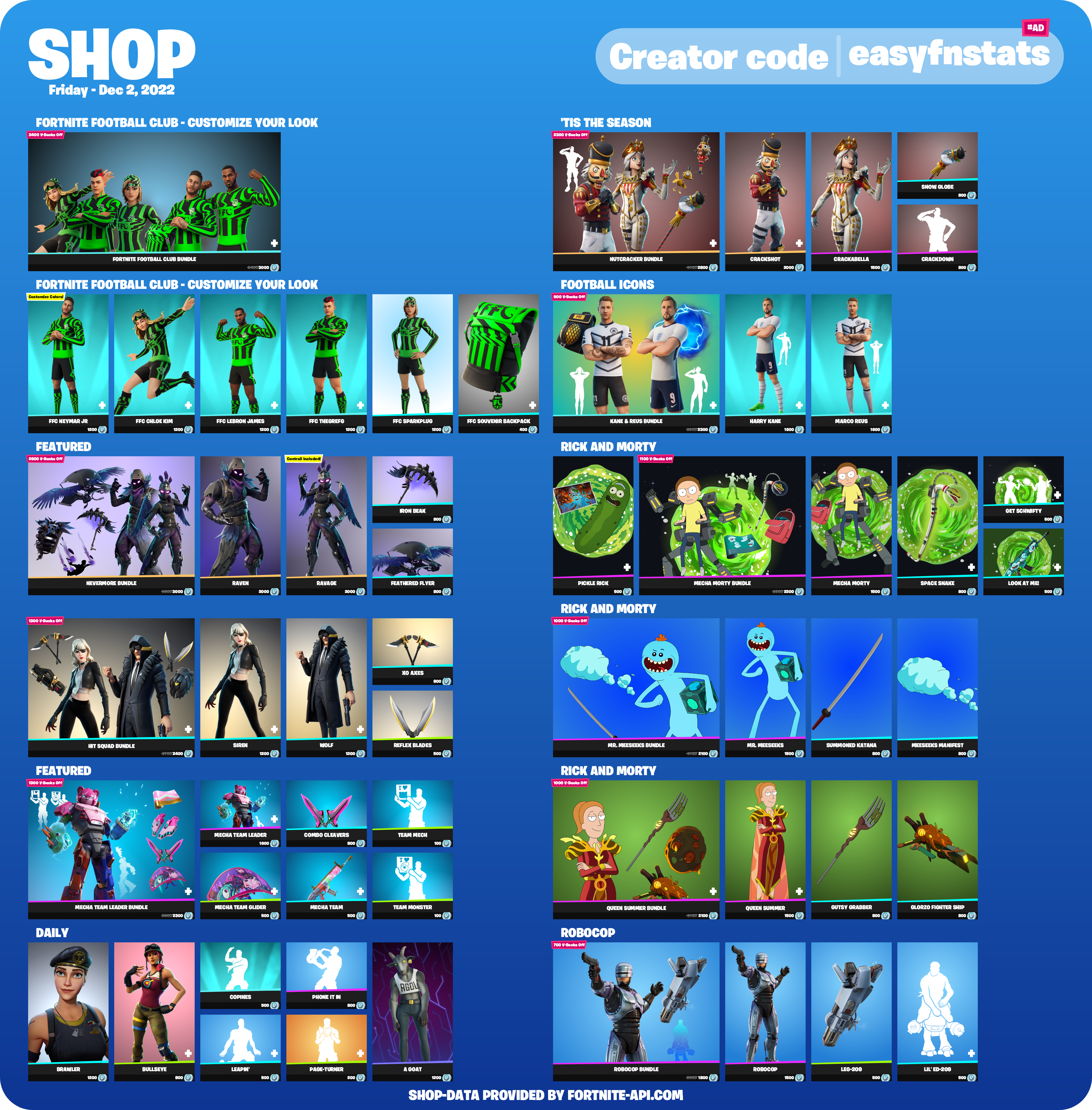
* **Reworked Item Shop image:** Item Shop image has been reworked. This now looks similar to the game.
  * Readability has been improved by decreasing the vertical size accomplished by the new form factor and split
  * Shop Categories, Bundle discounts and an icon referring to special items had been added
  * Creator Code visibility has been improved

<figure><img src="https://shop-beta.easyfnstats.com/443432012095946753/2022_12_02_en.png?t=1669939208" alt=""><figcaption></figcaption></figure>

* Source for cosmetics in `/cosmetics` are now available for almost any item, however just in English
* Radio stability has been improved. Especially 24/7 mode works now more reliable.
* Item shop image, stats image, season progress bar image and drop image generation speed have been improved
* All mentions of commands are now clickable. When you click on them you can execute the command directly
* Setting up automatic updates like Item Shop, News, etc. has been temporarily changed to dropdown menus.
* Setting custom creator codes now works via a modal, a popup with a text field.
* Changing premium custom background is now accomplished by a dropdown menu. These image can be managed with `/image`&#x20;
* Rework `/event` command. It now include better timestamps and includes all events.
* Improved volume selection for radio
* Improved handling of prompts which require to confirm and possible follow-up messages
* Improved button menus that cause fewer problems and improve performance

### Fixes

* Fixed error message when activating nick stats although another nick stats type is already enabled
* Fixed an issue that caused data to not be saved properly, resulting in data loss or delayed availability
* Fixed arena hype lookup
* Improve overall performance by reducing the high workload caused by background tasks
* Users who use Portuguese (Brazil) language, some parts of the bot were displayed in normal Portuguese. This issue has been fixed.
* Fixed `/drop` image markers being off due to a change in Season 2

### Removals

* All prefixed commands (commands starting with `!fn`, such as `!fn shop`) have been removed. The bot now works exclusively with slash commands
* Removed support for custom prefixes for premium users. This change is accompanied by the removal of prefixed commands.
* Remove Challenge related features
* Remove [discordlist.space](https://discordlist.space) support due to shutdown

## V3.3.2 - 2022-06-15

This patch is an emergency fix due to recent bot crashes.

{% hint style="warning" %}
Discord extended the Slash Command enforcement until 09/01/2022. Our migration period has been extended until 08/01/2022. This date marks the end of the availability of text commands. (eg.`!fn shop`)
{% endhint %}

### Additions

* Added `/fn` command which will be suggested by Discord when using the text commands on Desktop.
* Added support for multi-language for the item shop

### Changes/Improvements

* Improve player name-check when using the stats command without autocomplete

### Bugfixes

* **The bot crashed in the past while generating the shop occasionally. This sometimes caused complete bot crashes after a few hours.**
* Fix `/shop` command if a user set their Discord language to Japanese and Korean
* Shop images now show Japanese, Korean, and Russian characters correctly
* Fix `/info`, `/server-status`, `/stats`, `/shop`  command in DMs
* Fix `/radio`, `/nickstats` command being available in DMs. These commands now only show up on servers.
* Fix buttons in the stats menu sometimes failing

## V3.3.1 - 2022-05-17

This patch mainly contains under-the-hood changes that implement recently released Discord features.

### Additions

* Implemented Discords new [Command Permissions System](https://discord.com/blog/slash-commands-permissions-discord-apps-bots) available under `Server Settings -> Integrations -> EasyFortniteStats`
  * `/setup`, `/settings`, `/data` commands are only available for members with Manage Server permissions

### Changes/Improvements

* The stats command's name option now provides search functionality for Fortnite Player names.
  * This function supports searching for EpicGames, Xbox Live, and Playstation Network player names.
  * EpicGames player IDs are also supported
  * Alternatively, you can enter a name or ID without selecting an option.
* The `/radio` command can now be used without selecting a radio station in the command itself. Instead, a dropdown selection is shown. This is especially useful when just resuming a radio session.
* The `/radio` menu always shows a dropdown for switching the radio station, instead of going through 2 steps.
* We fixed a performance lack which should result in better performance and should reduce "Interaction doesn't respond" error messages
* Improved stats image creation speed
* Most commands have been enabled in direct messages
* Selecting a player name and a Discord user at the same time in the `/stats` command now results in an error message for clarification.
* Improved a few messages to make things clear

### Fixes

* Fixed an issue that caused an endless loading state when retrieving your stats or linking your account
* Premium enabled server wasn't able to use the `/data` server commands.
* Fixing issue problems when interacting with the radio menu while the bot is disconnected&#x20;

## V3.3.0 - 2022-02-01

{% hint style="danger" %}
This update introduces a 3 month transition period from normal Text Commands (eg.`!fn shop`) to the new Slash Commands (eg.`/shop`). On 04/01 all text commands will finally be disabled.
{% endhint %}

### Additions

* Added support for [Slash Commands](https://support.discord.com/hc/en-us/articles/1500000368501-Slash-Commands-FAQ). All previously available commands are available as normal commands and slash commands.
  * Some command error messages are now [Ephemeral Messages](https://support.discord.com/hc/en-us/articles/1500000580222-Ephemeral-Messages-FAQ), which will only be shown to the user who invoked the command
  * The `/stats` provides a list of available input types.
  * `/challenges` now provide you a list of available weeks for the optional week argument
  * `/news` now provides the list of modes to select from
  * `/radio` provides you the list of available radio stations
  * Instead of having individual `!fn bplvl` or `!fn wins` commands, the slash command implementation uses `/nick-stats`. This also provides a list of available types.
  * `!fn seasoninfo` command was renamed to `/season` as a slash command
* Added a Context User Command which allows receiving the stats of a specific user. Just right-click a user in your server -> Click ''Apps" -> Select "User Stats"
* Added `/cosmetics` Command which provides details about a specific cosmetic.
  * This command is only available as a slash command
  * Cosmetic Names can be autocompleted
  * Pro mode command option available. This will provide more details often useful for leaks.
* Added an option to `/settings` that allow the bot to prefer the user's language over the server language. Active by default.
* Nick Stats now support Arena Hype using `/nickstats stats-type:Arena Hype points`
* Added game-info argument to `/season` command. This provides general information about the game. \[Slash command only]

### Changes/Improvements

* Improved speed of receiving stats
* When using a text command the bot replies to the user's command.

### Fixes

* Fixed error which blocked creative news setup
* Fixed error which occasionally when pre-selected an input type and switching the stats type which didn't have stats for the desired type yet
* Fixed issue that the bot doesn't respond if selecting an input type which the player never played with
* Fixed an error that was raised when using a quote like character in the stats text command (eg. `"`, `‘`, `《`)
* Fixed error which occurred when setting up automatic updates and providing an invalid channel or role and the bot got no permissions to respond
* Fixed rare issue which caused an error when starting the radio
* Fix rare issue which breaks the auto channel setup

## V3.2.1 - 2021-10-23

### Changes/Improvements

* Switched the verification System: The new verification isn't based anymore on accepting a friend request and providing a 4-digit code. Now you just need to log in with your account on the EpicGames website and need to authorize EasyFortniteStats to verify your account
* Temporarily disabled the challenges command, due to the new challenges format which has been introduced in Season 8.
* Reduced radio quality from 384kb to 128kb for a more stable experience

### Fixes

* Fixed problem which caused that the verification stopped when clicking the checkmark icon in direct messages
* Fixed a problem caused that other users were able to interact with buttons from commands invoked by other users.
* Fixed an error that occurred when using `!fn challenges [week]` with a non-number argument for the week.&#x20;
* Fixed an issue that news wasn't updated properly
* Fixed possible errors which occurred while setting up a bot feature and messages were already deleted
* Fixed a problem which caused that the hype amount displayed where wrong.
* Fixed problem which didn't fully respect pre-seasons and may caused displaying the wrong arena hype value

## V3.2.0 - 2021-09-04

### Additions

* Added support for [Discord's new buttons](https://support.discord.com/hc/en-us/articles/1500012250861-Bots-Buttons). Following features support buttons:
  * Challenges (including seamless switching between weeks)
  * Stats (including seamless switching between input types and stats types eg. Lifetime)
  * News (including seamless switching between Gamemodes eg. BattleRoyale)
  * Radio (more details below)
  * Map (shortcut to open the map in full quality)
  * Drop (generate a new location with just one click)
  * Help (more details below)
  * Confirming (Verification, Data deletion)
  * Settings (General, Shop, Challenges, ServerStatus)
  * Voting (Shortcut to open main Vote page)
* Automated News Updates: News can now get automatically posted into a specific channel like challenges or the item shop. This feature can be set up with `!fn news settings`
* Radio Stable Release: Radio has been now finally been implemented. It's more stable and less buggy. All subcommands have been removed. Only `!fn radio` is needed to open the player which lets you manage the bot with the new buttons.
  * Added 24/7 Playback for **premium users**🔸
  * Due to the extra required resources, volume control is only available to **premium users** 🔸
* Help rework: The help command has been fully reworked and now supports buttons and dropdown menus.
  * Commands are now sorted into categories
  * Categories can be navigated with a dropdown menu
  * A bot news section has been added to the help command
* Settings Rework: Settings have been redesigned with buttons. Also `!fn settings` is now a place to reach all bot settings including Shop, Challenges, etc.
* Stats now let you select an account if there are multiple accounts with the same name
* Added `!fn review` to show off all pages to review the bot.&#x20;
* After setting up automatic updates, initially all data is sent into the channel. (latest shop, current seasons cheat cheats, etc.)

### Changes/Improvements

* The bot doesn't require the "Add Reactions" permission anymore
* The general bot speed has been optimized
* Dates and Times shown by the bot are now based on your timezone
* Countdowns/Relatives Dates/Times now automatically updated

### Fixes

* Fixed that Arena Hype was reset too early for most users&#x20;
* Fixed a few wrong terms and typos
* Nick Stats setup has been fixed
* Fixed mentions in shop updates

## V3.1.0 - 2021-05-21

### Additions

* Competitive Stats: Get just your Arena and Tournament matches including Arena Hype, Division, Earnings, and FortniteTracker.com's Power Ranking (`!fn comp`)

![](/files/-MaF1jxKQDgsvtwAbW6l)

* Seasonal Stats: Only display the stats that you have earned in the current season. (`!fn season`)
* Season Command: View info on the current season and progress (`!fn seasoninfo`)
* Added Trio Stats in Stats image
* Added Privacy Policy: [https://www.easyfnstats.com/privacy](https://www.easyfnstats.com/privacy/)
* Added support for server and user data deletion (`!fn data server delete`, `!fn data user delete`)
* The Bot has been added to [https://discordextremelist.xyz/](https://discordextremelist.xyz/en-US/bots/fortnite)

### Changes

* Reformatted Stats Image

![](/files/-MaF1e1EJbZdOY_mDT2b)

* Moved FAQ to docs (`!fn faq`)

### Fixes

* Fixed issue that selections work when adding the same reaction in another channel
* Fixed issue that bot lobbies still included
* Fixed verification error message if an account is claimed
* Fixed shop command which doesn't work in rare cases
* Fixed issue that the shop image is sometimes missing
* Fix that BattlePass level progress bar broken on too small progress
* Fix reaction doesn't work on verification start

## V3.0.0 - 2021-03-08

V3 is a complete overhaul of V2. The source code has been 100% re-written and nothing was copied from the old Bot. This causes that all bugs from old versions to get fixed. V3 offers a fresh new feel and look without being unfamiliar.

### Additions

* Account Verification: Verify that you own a specific account and get benefits (`!fn verify`)
* Nick Stats: Show off your BattlePass level or wins in your nickname. More types coming soon! (`!fn bplvl`, `!fn wins`)
* Global Stats: You now can now also get all stats from all different input types combined
* News: The bot now supports BattleRoyale and Creative in-game news (`!news`, `!news creative`)
* Fortnite Radio: Listen to the Fortnite in-game radio channels live in Discord. (`!fn radio`)
* Fortnite Shop now supports multiple languages
* Stats image now show off how often you placed Top 25
* Premium now will be automatically granted and can be en/disabled through a command (`!fn premium`)
* All reaction/text menus have been overhauled. You also can react during reactions are getting added
* `!fn challenge` now takes a `[week]` parameter for quick access eg. `!fn challenges 3` :arrow\_right: Shows the week 3 challenge cheat
* User with `Manage Server permission` can now also modify the bot
* `!fn cluster` command for Cluster overview
* `!fn data` command to receive the data saved by the bot
* Prefix setting for **Premium** users (`!fn settings`)

### Changes

* Changed the Stats calculation.&#x20;
  * More LTM stats and Trio are now included in Stats Calculation
  * Bot Lobby rounds are no more counted
* New Stats image design (`!fn stats`)&#x20;

![New Stats Image Design](/files/-MTKwpZm7gouqa9C0NvX)

* New Item Shop image design (`!fn shop`)

![New Shop Image Design](/files/-MTKxHKC74TlqkRvGCeC)

* `!fn challenges` now support up to 15 instead of 10 weeks
* `!fn drop` has been overhauled by adding more locations that get automatically updated. Also, the location gets marked on the map.&#x20;
* The Information shown in `!fn info` was updated
* Updated the `!fn event` command with the latest events

### Fixes

* Instability issues have been resolved. Crashes or timeouts should now be rarer.
* No, half or wrong challenge images were shown
* No more "Please finish your last action before you can execute another command." :tada:&#x20;

### Removals

* Score, Average Kills, and Stats won't be displayed anymore, because they were irrelevant or duplicated&#x20;
* Support for getting stats from other members by Name#Tag (This change was made due to Discord limitation and may be changed when Discord add an alternative way)
* Removed Danish and Ukraine due to missing translator and low demand&#x20;


# Upcoming Features

Get a sneak peek! Discover what's on the horizon for the EasyFortniteStats Bot.

#### Just Implemented \[V3.7.0]

* Item Shop Reminders
* [Linked Roles](https://discord.com/build/linked-roles): Fortnite Connection

#### Next Update

* Account System: Creator Code earnings Stats (Premium)
* `/player-count`: more time windows including 1 Month, 1 Year

#### Soon

* &#x20;Autobuy for Account System + Overview of purchased items

#### Near Future

* Competetive Turnement Feed + Placement
* Overhaul news command with blog entries + Blog entry auto channel
* Command translations
* Button below Item Shop message for Shop History

#### Unforeseeable future

* Save the World mission alerts
* LTM Updates + Active command
* Item Shop Voting with global results
* Weapon Info command
* `/account creator-code`: Creator code search support


# Premium

Unlock exclusive benefits with our Premium plans, whether for your user account or your server. Enjoy enhanced functionality and priority access to features.

## User Subscription

A user subscription grants you special perks across the platform, designed to improve your experience.

### Perks

#### EasyFortniteStats Perks

<details>

<summary>Extended Item Shop Reminders</summary>

As a standard user, you're limited to 10 item shop reminders. With Premium, you can set up to 50 reminders, helping you track more of your favorite items.

</details>

<details>

<summary>No Creator Code Ads</summary>

When using the Account System, you won't see any ads for our creator code, meaning no interruptions while logging in or spending V-Bucks through the bot.

</details>

<details>

<summary>Creator Code Preview</summary>

See a preview of the creator code you'll be using when purchasing items with V-Bucks through the bot. You can also customize the creator code before finalizing your purchase.

</details>

<details>

<summary>Automatic Creator Code Refresh</summary>

Set up a creator code that automatically refreshes every 14 days, so it never expires. This ensures a creator code is always set when purchasing items.

</details>

#### Support Server perks

<details>

<summary>Premium Role</summary>

Receive a special Premium role in the official support server, giving you a unique color and higher position in the member list.

</details>

<details>

<summary>Priority Support</summary>

Gain access to a dedicated channel for Premium members, where you'll receive faster support and priority when it comes to resolving issues.

</details>

<details>

<summary>Premium Chat</summary>

Join an exclusive chat channel for Premium users. Here, you'll receive important updates about premium features and can engage with other premium members.

</details>

### How to Subscribe

The User Premium Subscription is currently available exclusively through Patreon for just $1 per month.

> [Subscribe on Patreon](https://patreon.com/easyfortnitestats)

## Server Subscription

{% hint style="info" %}
Every server subscription includes 1 free user subscription for the account subscribing.
{% endhint %}

The **Server Subscription** provides exclusive perks for the server you choose.

### Perks

<details>

<summary>Priority Updates</summary>

Your server will receive priority for automated updates, such as Item Shop, Server Status, and News. This means updates will arrive up to 45 minutes faster than for non-premium servers.

</details>

<details>

<summary>Custom Background Images</summary>

Set custom background images for Item Shop and Stats visuals to give your server a unique look.

</details>

<details>

<summary>No Advertising</summary>

Premium removes all ads related to the bot, including ads for voting or the creator code (Note: Account System ads are not included).

</details>

<details>

<summary>Custom Creator Code</summary>

Display your custom creator code in the Item Shop image on your server. This applies to automated updates and the `/shop` command.

</details>

<details>

<summary>24/7 Radio Playback</summary>

Keep your radio playing continuously, even when all users leave the channel. The bot will also automatically reconnect after restarts to ensure uninterrupted playback.

</details>

<details>

<summary>Radio Volume Control</summary>

Customize the radio volume, with the ability to increase it up to 200%. The default setting is 50% to conserve bandwidth.

</details>

<details>

<summary>Faster Nick Stats Updates</summary>

Nick Stats will update every hour instead of every 3 hours, providing more timely information.

</details>

<details>

<summary>Restrict Nick Stats Changes</summary>

Prevent users from using fake stats in their nicknames. The bot will automatically reset any altered stats to the correct values.

</details>

### How to Subscribe

The Server Premium Subscription is available on Patreon for $4.50 per month. You can also opt for discounted bundle plans that provide server subscriptions for multiple servers.

> [Subscribe on Patreon](https://patreon.com/easyfortnitestats)

Alternatively, you can subscribe directly within Discord, which might be more convenient since everything, including payment, is managed within the platform. However, due to higher fees, the cost is $5 per month via Discord.

> [Subscribe on Discord](https://ptb.discord.com/application-directory/444203099331231746/store/1135707837524349069)


# FAQ

Got questions? Explore our FAQ for answers on the EasyFortniteStats Bot. Learn more, troubleshoot issues, and optimize your bot experience.

## General

<details>

<summary>Why are the normal text commands no longer available?</summary>

On August 31, bots can no longer read all message content. This means that the bot no longer knows whether and which command was executed. This provides more privacy, but forces the messenger developers to switch to slash commands at the same time. Read more [here](https://support-dev.discord.com/hc/en-us/articles/4404772028055-Message-Content-Privileged-Intent-for-Verified-Bots).

</details>

<details>

<summary>How do slash commands work?</summary>

You only need to type `/` in the chat window, which opens a menu with all available commands, sorted by bot. You just need to select the command of your choice. Read more [here](https://support.discord.com/hc/en-us/articles/1500000368501-Slash-Commands-FAQ) about slash commands.

<img src="/files/JfTnx7sUqXFvlSooBDeZ" alt="How to execute the /help command." data-size="original">

</details>

<details>

<summary>I can't see a slash command, how can I change that?</summary>

#### No Permissions

Users may not be able to use slash commands in this channel. For this, the users who should be able to use the commands must get the **Use Application Commands** permissions.&#x20;

</details>

<details>

<summary>The bot doesn't respond, what can I do?</summary>

In most cases, this issue is caused by the wrong permission setup. The Bot requires 'View Channel' permissions in the channel you like to use the bot. If you are inexperienced you might grant Administrator permissions.

In rare cases, it might be caused by a bot restart or outage. If you checked the permissions and the bot doesn't answer for more than 10min feel free to contact us on [our support server](https://easyfnstats.com/discord).

</details>

<details>

<summary>How can I disable certain commands?</summary>

Discord recently introduced the [Command Permissions System](https://discord.com/blog/slash-commands-permissions-discord-apps-bots). This allows you to allow or deny specific **Slash Commands** to certain roles, users or channels. To get started go to **Server Settings** -> **Integrations** -> **EasyFortniteStats** and modify the given settings.

<img src="/files/ojRMIxpXbyaeN85iYMHJ" alt="" data-size="original">

</details>

## Stats

<details>

<summary>My account was not found. What can I do?</summary>

Normally all accounts should be found. First, check if you might have a typo in your name. Also, if you are an Xbox or PlayStation 4 player, you may need to upgrade your Fortnite account on <https://epicgames.com/> to a full EpicGames account.

</details>

<details>

<summary>My stats are wrong. How can this be?</summary>

The bot retrieves the stats directly from EpicGames, so they can't be wrong. There might be a typo in your EpicGames, PlayStation Network, or Xbox Live account name, or a wrong account got selected. Also, it isn't possible to compare the stats with other sources, because the bot displays them differently.

</details>

<details>

<summary>My stats are not up to date. What is the reason?</summary>

EpicGames don't update the stats immediately after each match. You have to wait a bit until they update. Sometimes it may take up to multiple hours.

</details>

<details>

<summary>Why does it say "Playtime since Season 7"?</summary>

EpicGames introduced the feature to track playtime in Season 7. That's why it's only been tracked since Season 7 (even though you played earlier).

</details>

<details>

<summary>What is the Power Ranking?</summary>

The Power Ranking, created by [Fortnite Tracker](https://fortnitetracker.com/), ranks the best players in the competitive field of Fortnite Battle Royale. The ranking is updated automatically every 24 hours and players move up based on their results in tournaments. Each tournament has a certain Tier, which is based on the competitive value of the tournament, the number of players, the format, and the prize pool. More Information [here](https://fortnitetracker.com/article/921/announcement-power-rankings-now-live).

</details>

<details>

<summary>My Hype, Divison, Earnings, or Power Ranking isn't up to date. How can this be?</summary>

These values depend on [Fortnite Tracker](https://fortnitetracker.com/). It may take multiple hours to update your competitive data.&#x20;

</details>

## NickStats

<details>

<summary>What happens when I change my name?</summary>

You can change your name at any time. You shouldn't write anything behind the stats value.

</details>

<details>

<summary>How often is my stats value updated?</summary>

The stats value gets updated every 2 hours (1 hour for premium servers) by the bot. Other delays are caused by EpicGames.

</details>

<details>

<summary>How do the wins get calculated?</summary>

All wins from all rounds where teams are not larger than 4 members are counted. (Excluding rounds with only bots)

</details>

## Account System \[`/account`] <a href="#account-system" id="account-system"></a>

<details>

<summary>How does this system work?</summary>

With this feature, you can log into your Fortnite account through the bot. This way, you can manage it via Discord. Like any other bot with such a feature, the bot receives full access to the Fortnite account, as this is the only way to provide such features.&#x20;

This bears the risk that your account could be stolen by a third party hacking the bot or that we exploit these accounts for our advantage. This means that you have to trust our development team. The following sections explain why you can trust us and what measures we take to protect you and your account.

</details>

<details>

<summary>Can I trust EasyFortniteStats?</summary>

Whether you can trust us or not is ultimately up to you. But we would like to list here what makes us so that you can trust us:

* EasyFortniteStats has been around since 2018 and since then we have always tried to offer our users the best possible experience.
* We take security seriously. Our server is secured according to the latest security standards. Additionally sensitive data, as your account data, is encrypted with military grade encryption
* The owner (@luc1412) is working with EpicGames to maintain the Discords bots in the [Official Fortnite Germany Discord](https://discord.gg/fortnitede)
* We are transparent and inform our users about possible risks and security measures

</details>

<details>

<summary>Can I get banned for using it?</summary>

There are no known cases in recent years where players have been banned for using such a feature. In rare cases, accounts were temporarily disabled or passwords were reset. As long as you have full access to the account and its mail, you can always regain access to the account. We also have taken measures to prevent such annoyances.&#x20;

Bans can be imposed at most if bugs are exploited with the help of the bot (e.g. XP glitches). However, we actively choose not to make such exploits available.

</details>

<details>

<summary>What does [BETA] mean for this feature?</summary>

This feature is currently still in a beta testing phase, although it is available in the normal bot. This means all features are free to use. In the future we'll lock features behind an affordable premium subscription.

Also currently, we have only been able to test and optimized the feature based on a small number of accounts so far. We can't guarantee that it will work with every account at the moment, so we're making it publicly available for anyone interested so we can improve the bot. However, these errors can only restrict the function of the bot, but cannot cause any damage to your account.

</details>

<details>

<summary>How do we handle our Creator Code?</summary>

We're pleased to advertise our Creator Code through the account feature. We appreciate every user who supports us as the costs associated with this feature have increased. Our Creator Code is only set with the user's knowledge and consent in the following scenarios:

* After the user logs in with `/account login` and confirms their consent
* If the user confirms their consent before purchasing or gifting items using the `/account shop` command, and only if no other code has been set
* If the user selects our code using the `/account creator-code` command
* If the code has expired and our code was the last one used, it will be renewed&#x20;

We prioritize transparency and user consent in all aspects of our platform and strive to provide a seamless and enjoyable experience for all users.

</details>

<details>

<summary>What is the locker value and how do we determine it?</summary>

This isn't an exact representation on how much money you spent on Fortnite.

Instead we accumulate the Item Shop V-Bucks price of all items you own. So it won't respect any discounts e.g. when purchased in a bundle. The real money value is a conversion based on the current V-Bucks price (1$ = 111 V-Bucks). This price is based on the cheapest V-Bucks bundle (1000 V-Bucks for $8.99). This has been changed with the recent [price increase](https://www.fortnite.com/news/upcoming-fortnite-pricing-alignment-in-czech-republic-denmark-eurozone-countries-united-states-and-more-in-october-2023).

</details>


# Tutorials

Dive into our video tutorials for step-by-step guides on the EasyFortniteStats Bot. Whether you're a beginner or advanced user, streamline your experience with visual walkthroughs.

## Admin/Owner Guide

coming soon

## User Guide

coming soon

## Premium Guide

coming soon


# Install the App

Ready to level up? Follow our simple steps to install EasyFortniteStats to your server or account.

There 2 ways to install EasyFortniteStats:

* Add to My Apps
* Add to Server

In most cases, adding the App to My Apps, is the easiest way to install. It allows you to use the App anywhere with most of it's features.

{% content-ref url="/pages/fZ3nsDtouny0NuUlpjEl" %}
[Add to My Apps](/start/install/account)
{% endcontent-ref %}

If you own or manage a server, you might want to add the app directly to it. This allows you to use the full feature set of EasyFortniteStats to enhance your server.

{% content-ref url="/pages/UWIyJHhZVNlDpk71sFiK" %}
[Add to Server](/start/install/server)
{% endcontent-ref %}

## Invite troubleshooting

### &#x20;I can't find my server. What's the reason?

The main reason for your server not appearing in the drop-down menu is the use of the wrong account. Make sure you're logged into the right account which you can check on the top of the invite screen. You should see your profile picture and Discord tag. If it's the wrong account, press the **Not you?** button.

<figure><img src="/files/hIV0q2rtTw2mP6htv1dQ" alt="" width="317"><figcaption></figcaption></figure>

### Discord asks me to verify my e-mail address.

If you like to add a bot to a server you require an account with a verified e-mail. Head over to your user settings and verify your e-mail.

## Which permissions are required for what reason?

| Manage Nicknames                        | NickStats¹                                                                         |
| --------------------------------------- | ---------------------------------------------------------------------------------- |
| Manage Webhooks                         | Automatically Shop, News and Server Status updates                                 |
| View Audit Log                          | NickStats¹ (Optional)                                                              |
| View Channels                           | Any command                                                                        |
| Send Messages                           | Any command                                                                        |
| Send Messages in Threads                | Any command                                                                        |
| Embed Links                             | Any command                                                                        |
| Attach Files                            | Few commands that upload files like images                                         |
| Read Message History                    | Automatically Shop, News and Server Status updates                                 |
| Mention @everyone, @here, and All Roles | Automatically Shop, News, and Server Status updates (when mention role is enabled) |
| Connect                                 | Fortnite Radio feature                                                             |
| Speak                                   | Fortnite Radio feature                                                             |
| Defean Members                          | Fortnite Radio feature                                                             |

¹ NickStats allows members to display stats in their nickname


# Add to My Apps

Add EasyFortniteStats to your account and use it everywhere!

### Step 1

Visit [easyfnstats.com/invite](https://easyfnstats.com/invite)

### Step 2

Click **Add to My Apps**, then confirm by clicking **Authorize**.

<div data-full-width="true"><figure><img src="/files/AM25TueJ4CyfNcfZXg35" alt=""><figcaption></figcaption></figure></div>

You've successfully added the app to your account.


# Add to Server

Add EasyFortniteStats to your server and use it's full potential to enhance your server.

### Step 1

Visit [easyfnstats.com/invite](https://easyfnstats.com/invite)

### Step 2

Click **Add to Server**

<figure><img src="/files/1xqDrqy5vF8DiGf8nPbW" alt=""><figcaption></figcaption></figure>

Now click **Select a server**. A drop-down menu should appear including all servers you got `Manage Server` permissions in. Select the server you want the bot to join. Afterwards click **Continue**.

<figure><img src="/files/AcWkZA2iZYh6lKWpiIB1" alt=""><figcaption></figcaption></figure>

### Step 3

After selecting a server, you should see something like this:

<figure><img src="/files/HIhpLqR0zRSh4fvNK2m1" alt=""><figcaption></figcaption></figure>

As long you are not experienced with Discord's permissions system, keep all permissions selected.\
Click the **Authorize** button and complete the **Captcha**. You now should get redirected to [this page](https://docs.easyfnstats.com/invite).


# Language

Speak your language! Learn how to customise the EasyFortniteStats Bot to communicate in your preferred language.

The bot supports multiple languages, which can be useful during setup or for servers where members predominantly speak a single language. By default, the bot selects the language based on the following priority:

1. The language set by the user in their Discord settings
2. The language configured using the `/settings` command
3. The server's default language set in the community settings

If no translation is available for a selected language, the bot will try the next option in the list, ultimately defaulting to English.

{% hint style="danger" %}
All translations, except for German and English, are community-contributed and may not meet the bot's default quality standards.
{% endhint %}

## Changing the Language

First, enter the following command to get into the settings menu:

```
/settings
```

Click the **Language** Button:

<figure><img src="/files/AdhwtTLE6lUVwFvS9P1A" alt="" width="375"><figcaption><p>Select the language settings</p></figcaption></figure>

<br>

A new menu will appear with a dropdown. Select your preferred language from the list:

<figure><img src="/files/NANGkSMmUxWHIz1IZ80e" alt="" width="375"><figcaption><p>Select a language</p></figcaption></figure>

Once you've completed these steps, the language will be updated successfully.

## Managing User-Specific Language Settings

You can choose to disable or enable the use of the language set in a user’s Discord client. Disabling this option ensures that all messages follow a single language across your server, regardless of individual user settings.

<figure><img src="/files/E696vVGvG7AHrq4bpmom" alt="" width="375"><figcaption><p>Toggle the use of the user's language</p></figcaption></figure>


# Item Shop

Gear up in style! Configure EasyFortniteStats to show Fortnite's latest item shop offerings right within your Discord.

## <img src="/files/R5wL6obgLm9nWTDl4rAt" alt="" data-size="line"> Premium Features

<details>

<summary>Priority Updates</summary>

Your server will receive priority for Item Shop updates. This means updates will arrive up to 45 minutes faster than for non-premium servers.

</details>

<details>

<summary>Custom Background Images</summary>

Set custom background images for Item Shop visuals to give your server a unique look.

</details>

<details>

<summary>No Advertising</summary>

Premium removes all ads related to the bot within the shop image and message, including ads for voting or the creator code.

</details>

<details>

<summary>Custom Creator Code</summary>

Display your custom creator code in the Item Shop image on your server. This applies to automated updates and the `/shop` command.

</details>

## Setup Item Shop updates

If you are using the bot for the first time or you have reset the settings, you have to set up the Item Shop function for the first time.

First, enter the following command:

```
/setup shop
```

Now you need to **select** at least one **channel** where the Item Shop will be broadcast daily. Optionally, you can select a role that should always be mentioned.

### Set Channel

You can set a channel by selecting it from the dropdown menu:

<figure><img src="/files/TasgXdsvmRaC63gwCNoL" alt=""><figcaption><p>Setting the item shop channel</p></figcaption></figure>

#### Possible Errors

* **Missing permissions** **•** The Bot missing permissions. The bot shows you which ones are missing. If you are inexperienced with Discord check out [this guide](https://support.discord.com/hc/en-us/articles/206029707-How-do-I-set-up-Permissions-) to set up permissions.
* **Too Many Webhooks** **•** The selected channel got too many webhooks. You need to delete at least one in the channel settings.

Once you have selected a channel, the item shop is set up. It should now appear in the selected channel.

### Set Mention Role

In addition, you can select a role that should always be mentioned when a new item shop appears. This can be selected via the second dropdown menu as follows:

<figure><img src="/files/Ce4YRPodLuWdUjBPKaEM" alt=""><figcaption><p>Setting the item shop mention role</p></figcaption></figure>

#### Possible Errors

* **Role mentionable by everyone •** Servers larger than 250 members can't use a role that is mentionable by everyone. This is for security reason to prevent possible abuse. Disable that @everone can mention this role in the server settings.
* **Missing permissions** **•** The Bot missing mention everyone permissions. If you are inexperienced with Discord check out [this guide](https://support.discord.com/hc/en-us/articles/206029707-How-do-I-set-up-Permissions-) to set up permissions.

### <img src="/files/R5wL6obgLm9nWTDl4rAt" alt="" data-size="line"> Background Image \[Premium only]

You might want to select a custom background image for the item shop. Therefore you first need to upload an image with `/image upload`. If it falls below the maximum image size specified below, you can select it.&#x20;

* Image Format: `.png`, `.jpg` and `jpeg`
* Recommended Image Resolution: Square-like aspect ratio with dynamic resolution.
* Max. image size: `5MB`

<figure><img src="/files/fmdSvAPyI6qsLqtZYTqe" alt=""><figcaption><p>Setting a custom Background Image</p></figcaption></figure>

You can also deselect the image from the dropdown menu, which will disable the custom background image.

### <img src="/files/R5wL6obgLm9nWTDl4rAt" alt="" data-size="line"> Creator Code \[Premium only]&#x20;

As a premium member, the bots Creator Code will be hidden from the Item Shop image. You my also want to provide your own Creator Code. After Clicking the Creator Code Button, a popup will appear where you can enter the Code in a text field.

<figure><img src="/files/LrvoKI4fMMQzeZZdocKg" alt=""><figcaption></figcaption></figure>

#### Possible Errors

* **Creator Code not found •** The given creator code either doesn't exist or is not active&#x20;

Once a Creator Code has been set, the popup always show the current code in the text field. You can disable the code by removing the code from the text field and submitting it.

### Enable/Disable Item Shop updates

You can disable or enable Item Shop posts while keeping all settings. Just click the Enable or Disable button

* If the green Disable button is shown, Server Status posts are currently active
* If the red Enable button is shown, Server Status posts are currently disabled

<figure><img src="/files/t1xR8nOZU6hjaZCmaZYS" alt=""><figcaption></figcaption></figure>


# Server Status

Always be informed! Configure the EasyFortniteStats Bot to provide real-time Fortnite server updates in Discord.

## <img src="/files/R5wL6obgLm9nWTDl4rAt" alt="" data-size="line"> Premium Features

<details>

<summary>Priority Updates</summary>

Your server will receive priority for Server Status. This means updates will arrive up to 15 minutes faster than for non-premium servers.

</details>

## Setup Server Status updates

If you are using the bot for the first time or you have reset the settings, you have to set up the Server Status function for the first time.

First, enter the following command:

```
/setup server-status
```

Now you need to **select** at least one **channel** where the Server Status will be broadcast.&#x20;

### Set Channel

You can set a channel by selecting it from the dropdown menu:

<figure><img src="/files/pb02YifskjrTlJlBfcje" alt=""><figcaption><p>Set Server Status Channel</p></figcaption></figure>

#### Possible Errors

* **Missing permissions** **•** The Bot missing permissions. The bot shows you which ones are missing. If you are inexperienced with Discord check out [this guide](https://support.discord.com/hc/en-us/articles/206029707-How-do-I-set-up-Permissions-) to set up permissions.
* **Too Many Webhooks** **•** The selected channel got too many webhooks. You need to delete at least one in the channel settings.

Once you have selected a channel, the server status is set up. It should now appear in the selected channel.

### Enable/Disable Server Status updates

You can disable or enable Server Status posts while keeping all settings. Just click the Enable or Disable button.

<figure><img src="/files/5zOtbkJukdUrgVURxaed" alt=""><figcaption></figcaption></figure>


# Radio

Tune in and game on! Learn how to set up EasyFortniteStats' radio feature, bringing Fortnite's in-game radio straight to your server.

The radio function allows you to listen to the radio stations from the game, which are usually only available when driving a car.

To start a radio session, simply join a voice channel where the bot also has access to. The `/radio` command makes the bot join and starts playback.

## <img src="/files/R5wL6obgLm9nWTDl4rAt" alt="" data-size="line"> Premium Features

<details>

<summary>24/7 Radio Playback</summary>

Keep your radio playing continuously, even when all users leave the channel. The bot will also automatically reconnect after restarts to ensure uninterrupted playback.

</details>

<details>

<summary>Radio Volume Control</summary>

Customize the radio volume, with the ability to increase it up to 200%. The default setting is 50% to conserve bandwidth.

</details>

## Permissions and DJ Role

By default, the currently active player is owned by the user who started it. Additionally all users with `Administrator` or `Manage Server` permission can also interact with the player. Furthermore a role named `Fortnite Radio` (name isn't case sensitive) is also able to control the player at any time.

{% hint style="info" %}
If only team members should be able to access the radio, for example, because it runs in 24/7 mode, all users should have their permissions removed for the `/radio slash` command.
{% endhint %}


# News

Stay informed with the latest! Configure EasyFortniteStats to deliver Fortnite's recent updates and news directly to your Discord.

## <img src="/files/R5wL6obgLm9nWTDl4rAt" alt="" data-size="line"> Premium Features

<details>

<summary>Priority Updates</summary>

Your server will receive priority for News updates. This means updates will arrive up to 15 minutes faster than for non-premium servers.

</details>

## Setup News updates

If you are using the bot for the first time or you have reset the settings, you have to set up the News function for the first time.

First, enter the following command:

```
/setup news
```

Then click the game mode you like to configure. In this example BattleRoyale News get configured.

Now you need to **select** at least one **channel** where the News will be broadcast. Optionally, you can select a role that should always be mentioned.

### Set Channel

You can set a channel by selecting it from the dropdown menu:

<figure><img src="/files/9tKkqW8wfSmMAmMKsjkb" alt=""><figcaption><p>Set News Channel</p></figcaption></figure>

#### Possible Errors

* **Missing permissions** **•** The Bot missing permissions. The bot shows you which ones are missing. If you are inexperienced with Discord check out [this guide](https://support.discord.com/hc/en-us/articles/206029707-How-do-I-set-up-Permissions-) to set up permissions.
* **Too Many Webhooks** **•** The selected channel got too many webhooks. You need to delete at least one in the channel settings.

Once you have selected a channel, the news are set up. It should now appear in the selected channel.

### Set Mention Role

In addition, you can select a role that should always be mentioned when a new news post appears. This can be selected via the second dropdown menu as follows:

<figure><img src="/files/EvD5TnEvoXkgPLGLWbBC" alt=""><figcaption><p>Set News Mention Role</p></figcaption></figure>

#### Possible Errors

* **Role mentionable by everyone •** Servers larger than 250 members can't use a role that is mentionable by everyone. This is for security reason to prevent possible abuse. Disable that @everone can mention this role in the server settings.
* **Missing permissions** **•** The Bot missing mention everyone permissions. If you are inexperienced with Discord check out [this guide](https://support.discord.com/hc/en-us/articles/206029707-How-do-I-set-up-Permissions-) to set up permissions.

## Enable/Disable News updates

You can disable or enable News posts while keeping all settings. Just click the Enable or Disable button

* If the green Disable button is shown, News posts are currently active
* If the red Enable button is shown, News posts are currently disabled

<figure><img src="/files/9mopvLIsOApsDl3WEj4F" alt=""><figcaption><p>Enable/Disable News</p></figcaption></figure>


# Nick Stats

Showcase your achievements! Set up EasyFortniteStats to reflect your Fortnite Wins and BattlePass Level in your Discord nickname. A dynamic way to share your progress with others.

## <img src="/files/R5wL6obgLm9nWTDl4rAt" alt="" data-size="line"> Premium Features

<details>

<summary>Faster Nick Stats Updates</summary>

Nick Stats will update every hour instead of every 3 hours, providing more timely information.

</details>

<details>

<summary>Restrict Nick Stats Changes</summary>

Prevent users from using fake stats in their nicknames. The bot will automatically reset any altered stats to the correct values.

</details>

## Modify Nick Stats settings

First, enter the following command. It doesn't matter if you like to set up BattlePass Level or Wins:&#x20;

```
/setup nickstats
```

### Enable/Disable Nick Stats

Depending on which Nick Stats type you like to set up you can press the appropriate button. Green means enabled, red means disabled.

<figure><img src="/files/Ed3M9m6Y1qsY8uPU9uoj" alt=""><figcaption></figcaption></figure>

### <img src="/files/R5wL6obgLm9nWTDl4rAt" alt="" data-size="line"> Forbid Changes \[Premium only]

You can toggle this feature by pressing the button. Green means enabled, red means disabled.

<figure><img src="/files/fIrPY0Ld9EbIm7BHsOGe" alt=""><figcaption></figcaption></figure>

## Reset Settings

You can also reset all settings when you press the button in the settings selection.


# Stats

Track your Fortnite metrics! Use EasyFortniteStats to view detailed stats like Wins and Battle Pass Level, all accessible with simple commands.

## <img src="/files/R5wL6obgLm9nWTDl4rAt" alt="" data-size="line"> Premium Features

<details>

<summary>Custom Background Images</summary>

Set custom background images for Stats visuals to give your server a unique look.

</details>

## Modify Stats Settings

First, enter the following command:

```
/setup stats
```

### <img src="/files/R5wL6obgLm9nWTDl4rAt" alt="" data-size="line"> Background Image \[Premium only]

You might want to select a custom background image for the stats image. Therefore you first need to upload an image with `/image upload`. If it falls below the maximum image size specified below, you can select it.&#x20;

* Image Format: `.png`, `.jpg` and `jpeg`
* Recommended Lifetime/Season Image Resolution: `1505 × 777`
* Recommended Competitive Image Resolution: `1505 × 624`
* Max. image size: `1MB`

<figure><img src="/files/pPCO0enpavkMujYfeYmm" alt=""><figcaption></figcaption></figure>

You can also deselect the image from the dropdown menu, which will disable the custom background image.


# Beta Info

Experience the latest experimental features of EasyFortniteStats before they’re officially released.

{% hint style="danger" %}
The Beta bot is unstable, and it's highly likely that you will encounter errors.
{% endhint %}

We do not recommend using the Beta version as your primary bot due to the following disadvantages:

* Longer and more frequent downtimes
* Increased likelihood of errors
* Delays of up to 30 minutes for Shop, News, and Server Status updates (except for Premium users)
* Premium access may be delayed by up to 1 hour

If you're okay with these potential issues, feel free to add the Beta bot.

#### What's New in the Beta Bot?

The latest features available for testing in the Beta bot can be found in the changelog. Look for latest updates if it contains the suffix **-BETA**. If not, the Beta bot will have the same features as the regular version.

{% content-ref url="/pages/-MTDQ\_wFew2TDs1iStwL" %}
[Changelog](/changelog)
{% endcontent-ref %}


# Thanks for inviting EasyFortniteStats

#### You have successfully invited EasyFortniteStats!&#x20;

### Need Support or stay updated about the latest changes? Join the Support Server.

### Get a list of all commands:

{% content-ref url="/pages/-MTDRF1kjWpD9IXOS56R" %}
[Commands](/commands)
{% endcontent-ref %}

### Get started with setting the language:

{% content-ref url="/pages/-MTXN1775BHoC-8sP8N9" %}
[Language](/start/language)
{% endcontent-ref %}