> For the complete documentation index, see [llms.txt](https://docs.easyfnstats.com/llms.txt). Markdown versions of documentation pages are available by appending `.md` to page URLs; this page is available as [Markdown](https://docs.easyfnstats.com/features/stats.md).
# Stats
Track your Fortnite metrics! Use EasyFortniteStats to view detailed stats like Wins and Battle Pass Level, all accessible with simple commands.
## Premium Features
Custom Background Images
Set custom background images for Stats visuals to give your server a unique look.
## Modify Stats Settings
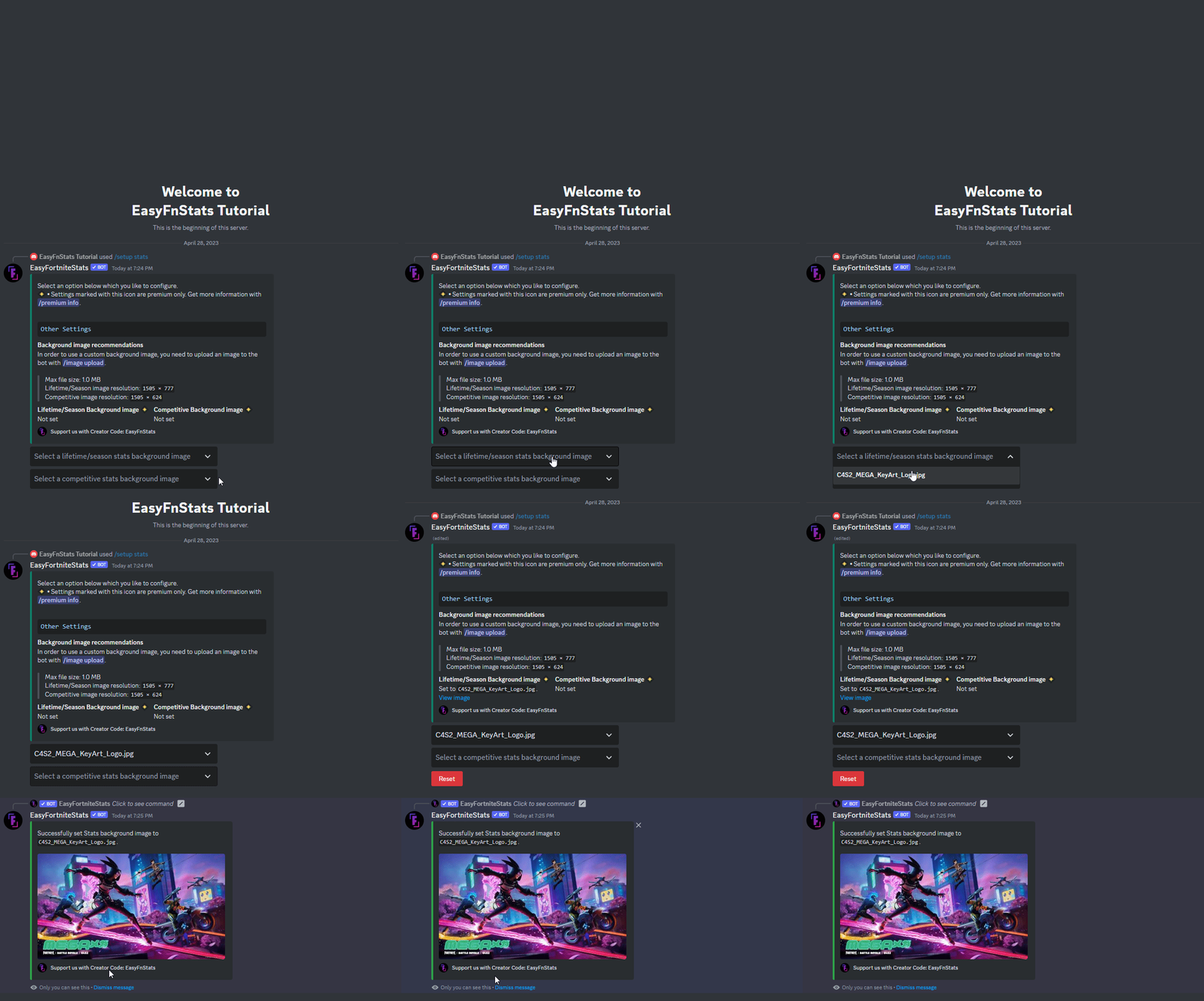
First, enter the following command:
```
/setup stats
```
### Background Image \[Premium only]
You might want to select a custom background image for the stats image. Therefore you first need to upload an image with `/image upload`. If it falls below the maximum image size specified below, you can select it.
* Image Format: `.png`, `.jpg` and `jpeg`
* Recommended Lifetime/Season Image Resolution: `1505 × 777`
* Recommended Competitive Image Resolution: `1505 × 624`
* Max. image size: `1MB`
You can also deselect the image from the dropdown menu, which will disable the custom background image.
 Premium Features